


Download GPGMail – Secure Email Encryption for Apple Mail
Overview
GPGMail is a free, open‑source plug‑in that brings the power of OpenPGP encryption directly into Apple Mail. For anyone who routinely exchanges confidential information—whether it’s business contracts, personal data, or sensitive research—sending plain‑text email is a serious risk. GPGMail eliminates that risk by encrypting outbound messages, signing them with a cryptographic signature, and providing seamless decryption for incoming encrypted mail. The plug‑in works with macOS versions from Snow Leopard (10.6) up through the latest releases, and it integrates cleanly with the native Mail interface, so users never have to switch to a separate client. Because it follows the widely adopted PGP standard, GPGMail can interoperate with other OpenPGP tools on Windows, Linux, Android, and iOS, making cross‑platform secure communication straightforward.
The development team behind GPGMail maintains a transparent bug‑tracking system and releases frequent updates to address compatibility issues—especially those that arise after macOS system upgrades. Recent releases have fixed critical bugs such as “Encrypt reply to OpenPGP‑encrypted message” not working, key‑selection dialogs failing to display, and passphrase‑handling crashes on macOS 10.6.7. In addition, the plug‑in now includes usability enhancements like a compressed DMG installer, a comment field in signatures, and clearer warnings when a private key is missing. All these improvements make GPGMail a reliable, user‑friendly solution for anyone who wants to protect their email without sacrificing the familiar Apple Mail workflow.
Key Features of GPGMail
- End‑to‑end encryption: Automatically encrypts outgoing messages using the recipient’s public key, ensuring only the intended party can read the content.
- Digital signatures: Adds a cryptographic signature that verifies the sender’s identity and detects any tampering after the message is sent.
- Seamless Mail integration: Appears as a native option within Apple Mail’s compose window; no separate UI is required.
- Cross‑platform compatibility: Uses the OpenPGP standard, allowing encrypted mail to be exchanged with Windows, Linux, Android, and iOS OpenPGP clients.
- Key management via GPGTools: Works with the GPG Suite keychain for secure storage and easy access to private keys and passphrases.
- Automatic updates: Checks for new releases and prompts users to download the latest version without leaving Mail.
- Customizable encryption policies: Users can set defaults to always encrypt, prompt per‑message, or encrypt only when a trusted key is available.
- Detailed logging & diagnostics: Provides clear error messages for common issues such as missing keys or invalid passphrases.
- Open source & community‑driven: The source code is publicly available on GitHub, encouraging transparency and rapid bug fixes.
- Multilingual support: Includes translations (e.g., Swedish) and community‑contributed documentation.
These features collectively make GPGMail a robust, future‑proof encryption solution for Apple Mail users. Whether you’re a corporate professional handling NDA‑protected data, a journalist safeguarding sources, or a privacy‑conscious individual, GPGMail gives you the tools to keep your communications private and authentic.
Installation, Usage & Compatibility
Step‑by‑step Installation
1. Download the DMG: Visit the official site gpgtools.org and click the “Download GPGMail” button. The installer is a compressed DMG with a background image for a smooth visual experience.
2.
Mount the image: Double‑click the DMG file; macOS will mount it on your desktop.
3. Run the installer: Drag the GPGMail icon into the Applications folder, or run the provided Install.pkg. The installer will automatically detect your existing GPG Suite and add the Mail plug‑in to the appropriate folder.
4.
Restart Apple Mail: Close and reopen Mail to allow the plug‑in to load. You’ll see a new “GPGMail” menu item under the “Message” menu.
5. Configure your keys: Open the GPG Keychain app (installed alongside GPGMail) and import or generate a new OpenPGP key pair.
Make sure your public key is shared with contacts and that your private key is securely stored in the macOS Keychain.
Using GPGMail in Daily Workflow
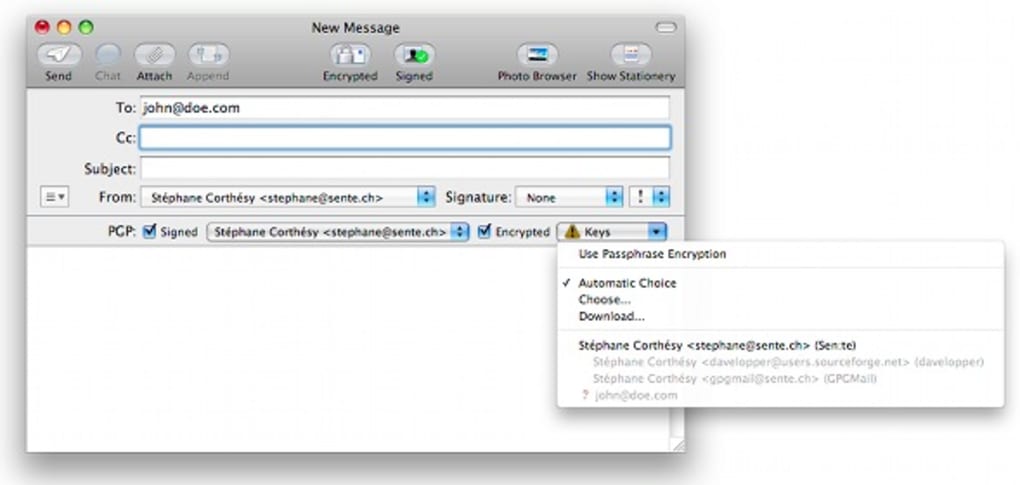
Once installed, GPGMail adds a small lock icon next to the “Send” button when a recipient’s public key is available. Clicking the lock toggles encryption on or off for that specific message. To sign a message, enable the “Sign” checkbox.
The plug‑in remembers your last choice, so if you usually encrypt all outbound mail, you’ll never need to manually enable it again. When you receive an encrypted email, Mail automatically decrypts it after you enter your passphrase (or if the passphrase is cached in the Keychain). Signed messages display a verification badge, allowing you to confirm the sender’s identity with a single click.
Operating System Support
GPGMail is compatible with macOS 10.6.7 and later, including the most recent macOS releases (Ventura, Monterey, and beyond). The developers actively monitor Apple’s system updates to patch any breakage caused by changes in Mail’s extension architecture. For users on older systems, a legacy version of GPGMail is still available, though they may miss out on the newest security patches. The plug‑in does not run on iOS or iPadOS, but encrypted messages can be read on those devices using third‑party OpenPGP apps that support the same key format.
Because GPGMail relies on the underlying GPG Suite, any updates to the suite (e.g., a new version of GPG Agent) are automatically applied, ensuring that cryptographic primitives stay current with industry standards.
Pros, Cons & Frequently Asked Questions
Pros
- Free and open‑source – no hidden fees or subscription model.
- Deep integration with Apple Mail, preserving the native user experience.
- Strong OpenPGP encryption and digital signatures for authenticity.
- Cross‑platform compatibility with other OpenPGP tools.
- Regular updates and an active community that quickly addresses macOS compatibility issues.
Cons
- Initial setup can be confusing for users unfamiliar with key management.
- Occasional bugs after major macOS releases require a brief waiting period for patches.
- No native mobile version; iOS users need a separate OpenPGP app to read encrypted mail.
FAQ
Is GPGMail completely free?
Yes. GPGMail is released under the GPL license and can be downloaded, installed, and used at no cost. There are no hidden fees, premium tiers, or mandatory donations.
Do I need a separate OpenPGP key for each contact?
No. You generate a single key pair (public and private) for yourself. For each contact you need to obtain their public key, which can be imported into your GPG Keychain. Once stored, GPGMail automatically uses the correct key when you address that contact.
What happens if I lose my private key?
Losing the private key means you can no longer decrypt messages encrypted to you or sign new messages. It is crucial to back up your private key in a secure location (e.g., an encrypted external drive). GPGMail does not provide a recovery mechanism because of the cryptographic security model.
Can GPGMail encrypt attachments?
Yes. When a message is encrypted, all attachments are included in the encrypted payload, ensuring that files cannot be accessed without the appropriate private key.
How often does GPGMail receive updates?
The development team releases updates several times a year, with additional emergency patches when critical macOS compatibility issues are discovered. Users are notified through the built‑in update checker in the GPG Suite.
Conclusion & Call to Action
In an era where data breaches and e‑mail interception are commonplace, GPGMail offers a reliable, cost‑free way to protect your communications without abandoning the familiar Apple Mail environment. Its adherence to the OpenPGP standard ensures interoperability, while the active development community guarantees that security patches and macOS compatibility fixes arrive promptly. Although the initial key‑management setup may require a modest learning curve, the long‑term benefits of encrypted, signed email far outweigh this temporary hurdle.
If you handle confidential information, collaborate across platforms, or simply value privacy, download GPGMail today and start encrypting your messages with confidence. The installation process is straightforward, and the plug‑in’s seamless integration means you’ll hardly notice any change in your daily workflow—except for the added peace of mind that only intended recipients can read your messages.
Ready to secure your inbox? Click here to download the latest GPGMail DMG, follow the quick installation steps, and enjoy encrypted email on macOS right away.







